HTML Tags
To making an attractive website, exercising tags is important as they're interactive learning that help you achieve your design simulation.
An HTML element serves as a container for content or
other HTML tag, represented by words closed in angle
classes, < and >.
These tags serve as keywords that guide the web browser on how to format and present the content.
Constantly Used HTML Tags
Below are some of the most used HTML tags, which regard for about 70 of operation.
Document Structure Tags
-
<!DOCTYPE html>: Defines the document type. -
<html>: Encloses the entire HTML document. -
<head>: Contains metadata and links to scripts(JavaScript) and stylesheets(CSS). -
<body>: Houses/Store the content of the web browser.
Metadata Tags
-
<title>: Specifies the title of the web browser. -
<meta>: Inventories metadata like character set, author, and viewport settings. -
<link>: Connects to external web pages/files similar as stylesheets.
Text Formatting markers/tags
-
<p>: Represents a paragraph. -
<h1>to<h6>: Indicate headlines. -
<strong>: Indicates strong emphasis (generally bold). -
<i>: Denotes emphasis (generally italic). <br>: Inserts a line break.-
<hr>: Creates a vertical ruler/line.
List Tags
-
<ul>: Represents an unordered list. -
<ol>: Represents an ordered list. -
<li>: Denotes a list point.
Hyperlink and Media Tags
-
<a>: Represents an anchor (used for links). -
<img>: Represents an image. -
<audio>: Represents audio content. -
<video>: Represents videotape content.
Form Tags
-
<form>: Represents a form. -
<input>: Represents an input field. -
<textarea>: Represents a textbook area. -
<button>: Represents a button. -
<select>: Represents a dropdown list. -
<option>: Represents options within a<select>or<datalist>.
Table Tags
-
<table>: Represents a table. -
<tr>: Represents a table row. -
<td>: Represents a table data cell. -
<th>: Represents a table title/heading cell. -
<thead>: Represents a group of table heads. -
<tbody>: Represents a group of table body content. -
<tfoot>: Represents a group of table footers.
Semantic Tags
-
<header>: Represents the title section. -
<footer>: Represents the footer section. -
<article>: Represents an composition. -
<section>: Represents a section. -
<nav>: Represents navigation. -
<aside>: Represents sidebar content.
Paired and Single HTML Tags
That was quite a lengthy list, but do n’t worry — we’ll explore each of these in detail. In HTML, tags are generally divided into two main orders:
1. Paired tags (Container Tags)
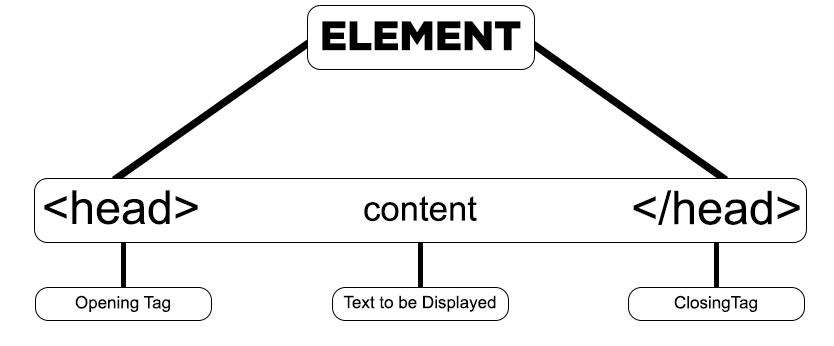
These tags come in pair, starting of an opening tag and a corresponding ending tag, with the content placed in between.
-
Opening tag: The opening tag begins with
<and concludes with>. For case,<p>. -
Ending tag: The ending tag also starts with
</and ends with>. For example,</p>.
For example:
-
<p>This is a paragraph.</p> -
<h1>This is a heading.</h1>
2. Single Tags (No-Ending Tags or Stand-Alone Tags)
These tags don’t need an ending tag, as they’re self-sufficient and contain all necessary information within a single tag.
-
No-ending tag: A no-ending tag starts with
<and ends with/>(the/is optional in HTML5). For example,<br>or<img src="..." />.
Note: If you later use React or a framework like Next.js, you’ll need to close tags like this. So, it’s a good idea to get into the habit!
For example of no closing tags:
<br>: Line Break<hr>: Horizontal Rule-
<img src="image.jpg" alt="My Image">: Image
Image Representation of HTML Tags
The image below provides a image definition of the structure of tags in HTML. It demonstrates that an element can pass other element, which in turn may contain indeed more rudiments, creating a tree- suchlike arrangement.
(This image here showing a box taged "<body>" containing two other boxes, one taged "<h1>My Heading</h1>" and another taged "<p>Some text.</p>". This imagely represents nesting of tags.)
This scale features both no- closing tags and nested tags, as shown in the example.
image representation of HTML tag structure
A example showing the structure of HTML elements.